Building a Blog with Framer, Part 3: Getting Found on Google and Naver
How I got my Framer blog into Google and Naver search results by registering it with Google Search Console and Naver Search Advisor, covering ownership verification, sitemap submission, and the actual search keyword data.
Series · Building a Blog with Framer (3/4)
It’s already been about five months since I built my blog with Framer and started running it.
Since I wasn’t using an existing blogging platform, the thing I cared about most was whether people would find the blog. No matter how many posts I publish, if no one sees them, it’s no different from talking to a wall. So what does it take for my content to show up in Google search results?
To show up in Google search results, I needed to set things up through Google Search Console so that my blog and its content could appear on Google. Once you connect Search Console and request indexing for the pages on your site, Google crawls your blog based on its text. To make crawling as quick and easy as possible, I kept the menu structure and menu names simple, and when writing posts, I paid attention to how I structured the content so the main keywords would get picked up in search results. You could say I did my own kind of SEO management. But there’s no single right answer among all the SEO setups people talk about, so I connected several systems to my Framer blog that let me check different metrics and run a variety of experiments. Here I’ve written up two of them: Google Search Console, which you really need to connect, and Naver Search Advisor, which is worth looking into as well if you want to show up on Naver, Korea’s largest search portal.
To give you the steps up front: for Google, you connect your domain to Search Console, verify ownership, and submit your sitemap. For Naver, you register your site in Search Advisor, verify ownership, and enter your sitemap and the URLs you want crawled.
Getting my content into Google search results
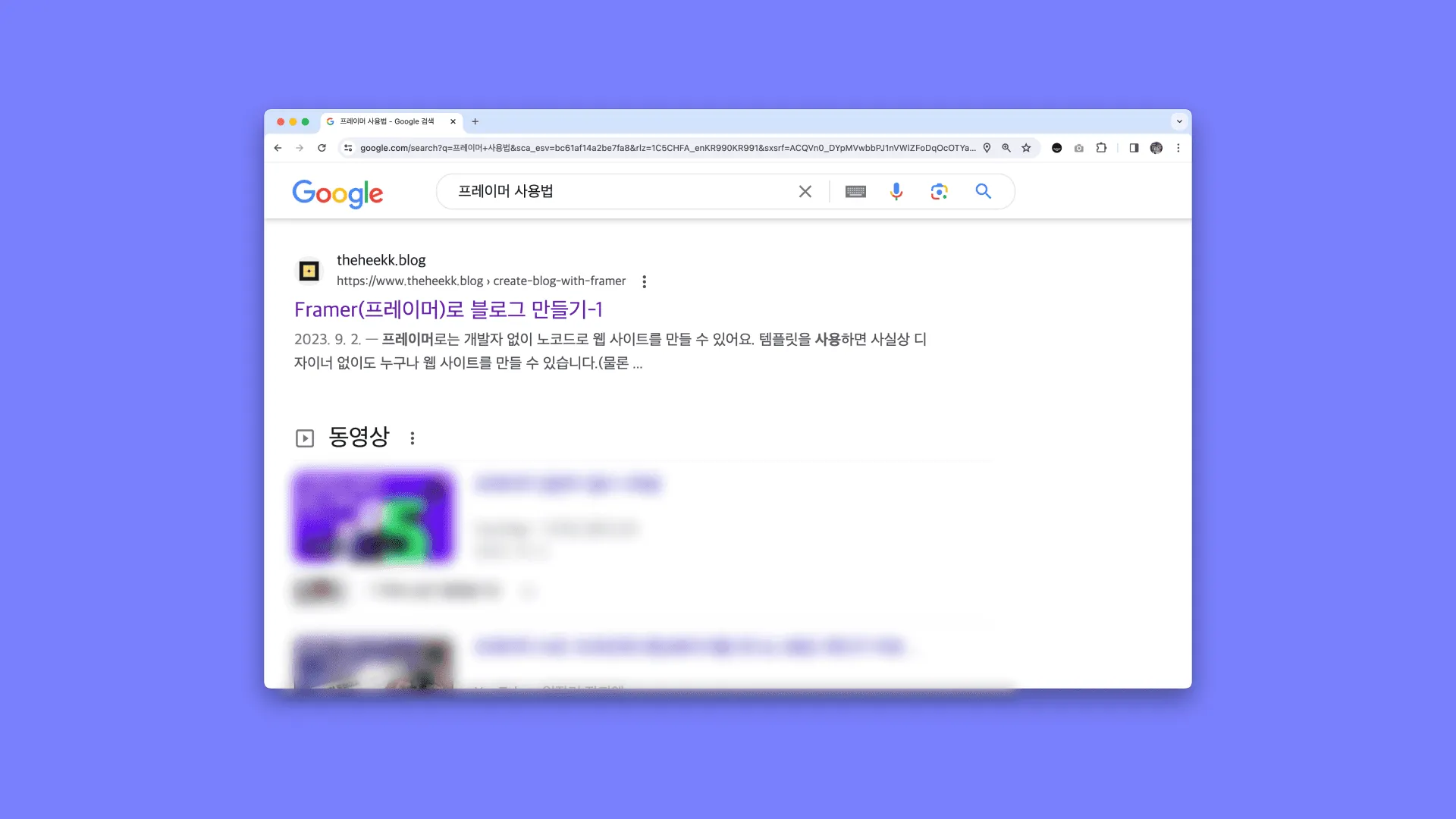
The image above shows my actual blog appearing in a search for '프레이머 사용법' (how to use Framer). It's holding a top spot not just for that keyword but for similar ones too.
For your content to show up in Google search results, you have to tell Google that your blog exists and what’s on it. The easiest way to think about Google Search Console is as the tool that makes this simple.
Connecting Google Search Console doesn’t just get you into search results. It also lets you see data organized around keywords: which keywords people use to find your blog, and how many people see each page on your site and how many click through. That’s how you can tell which content people find appealing. Google Analytics shows some of this too, but if you want to see it organized by keyword, Google Search Console is more convenient.
How to connect Google Search Console
-
Connect your domain
-
You can connect either a ‘Domain’ or a ‘URL prefix’.
-
Sites built with Framer support https, so I recommend registering a ‘URL prefix’ that starts with https.
-
-
Verify ownership
-
Framer doesn’t support the file upload method, so you copy the HTML tag and add it to Framer as a meta tag.
-
Copy the meta tag Search Console gives you, paste it into the
headtag section underFramer settings > General > Custom code, and publish. -
Once Search Console confirms ownership, your site is registered correctly.
-
-
Submit your sitemap
-
You need to submit your sitemap to Search Console so your data can be collected effectively.
-
Add sitemap.xml after your domain name and submit that as your sitemap link.
-
Once the sitemap is submitted, results start appearing on Google.
-
With this setup, Search Console indexes the new pages I publish on its own, and when they show up in Google search results, it records which keywords and paths brought people in.
Looking at Google Search Console data
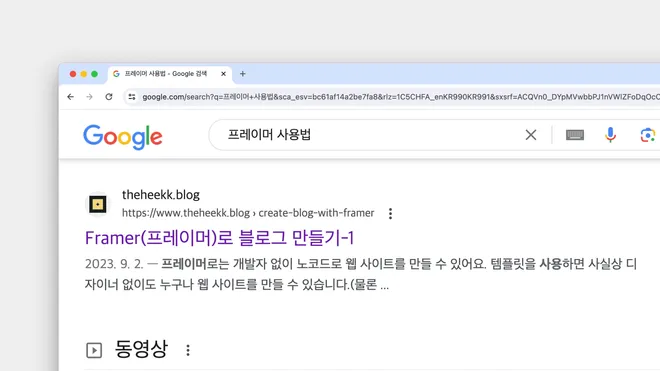
Google search keywords and average visitor engagement time from the Search Console report. Putting this together with other data beyond the image here, I found that visitors who came in from search had a higher average engagement time than visitors who came in directly.
Of everything I’ve published so far, Framer content has by far the highest keyword search volume.
That’s the result of aiming to claim those keywords from the moment I built the blog. In Korea, there’s very little information about Framer. You have to rely on Framer’s official website or YouTube videos (and even those are from the official channel). What people in Korea need is less a detailed explanation of every feature and more information about the handful of features they’ll use often, and that was hard to find.
So I focused my posts on the features people look for most, and content that ranked in the triple digits for Google keyword searches when I first published it now sits in the top three on the first page of results. Google Search Console is what lets me see results like this. By checking the keywords people searched before landing on my blog, I get help planning my next posts so they’re a little more tailored to the people I’m writing for.
Google Search Console also gives you Search Console Insights, a report that summarizes the key data. Search Console Insights summarizes data from the last 28 days. It gives you a summary of total post views, visitors’ average engagement time, and the main keywords and links bringing people in.
Among my recent posts, my summary of Barbara Minto’s The Pyramid Principle (in Korean) doesn’t get much keyword search volume, but it was shared widely and picked up a lot of backlinks, so its traffic easily passed the combined traffic of all my other posts so far. People say backlinks are the most important thing in SEO, and this time I really felt their power. (Please share my posts far and wide🥺)
Google dominates search traffic globally, but in Korea a lot of people use Naver too, so I got curious how much my posts would show up on Naver.
Getting my content into Naver search results
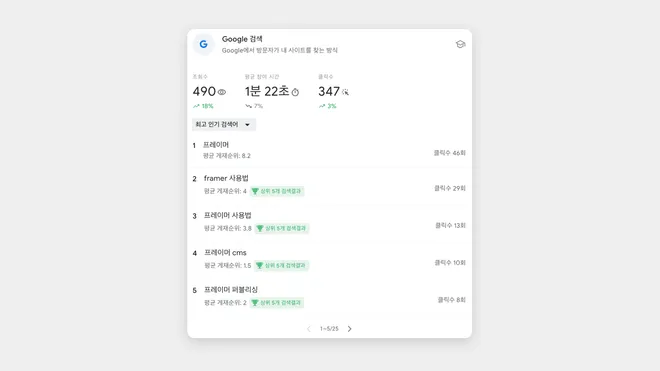
The Naver search results page for '프레이머 유료' (Framer paid plan), the Framer-related keyword that brought in the most traffic. My content shows up second from the top.
To be honest, I didn’t expect much when I connected Naver’s search report, and as I suspected, its search volume ended up far below Google’s.
Even so, what was meaningful was that the keywords people search on Google are different from the ones they search on Naver. There’s still too little data to really compare them, but I’m hoping I’ll find some insights once more data builds up.
Connecting Naver Search Advisor
The way you connect it is similar to Google. You sign up with a Naver account and go through the site registration steps. The difference from Google is that it asks for an RSS address. But Framer doesn’t officially support RSS. I asked Framer through their official website too, and they said they wouldn’t support RSS for the time being, so I left out RSS registration and went through only the remaining steps.
-
Connect your domain
-
Register the site
-
Verify ownership
-
Submit the sitemap
-
-
Enter URLs to request crawling (수집 요청)
I just skipped the RSS step and waited for the site to be registered.
Looking at Naver Search Advisor data
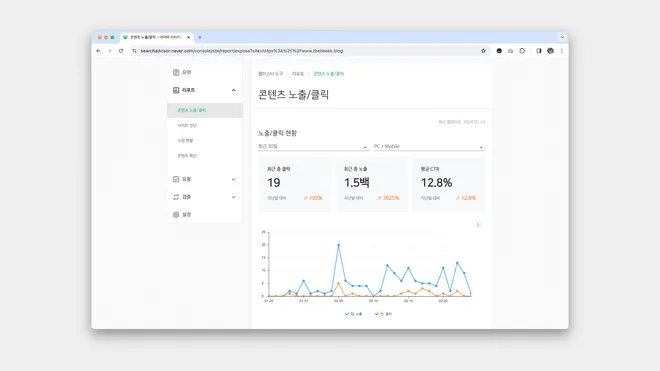
I forgot about it and checked the report about a month later, but the search volume was 0, so it was hard to tell whether data was being collected or whether no one was searching on Naver at all. When I went back in after some more time had passed, the data had built up properly! The search volume was small, but either way I could confirm that my blog was showing up and getting visitors on Naver as it should.
In Naver Search Advisor, I could also see content impression/click data and the search keywords. Compared with Google Search Console, it offers only a few kinds of data, but I found it interesting that the main keywords people searched on Naver before landing on my blog were different from those of people who came from Google.
A designer who looks at data after work
After work, I look through my blog data as part of my daily routine. Not every day, but checking closely for a few days before and after I publish a post has somehow become a routine. It’s a lot of fun to look at the data: which keywords visitors are most interested in, what day and time bring in the most traffic, and which websites people came from when they arrived through a backlink. I don’t write for the metrics, but sometimes the metrics cheer me on, so you could say they give me some motivation to keep writing.
What started as studying Framer on my own has turned into a hobby, and as it keeps growing, I keep learning new things. I hope all of this is useful, both for me and for you reading this.
This post was translated from the original Korean version. Read in Korean